



This product is discontinued and no longer available.
Suggested replacement: PCAN-RS-232 FD - Programmable RS232 CAN/CAN FD Converter
Programmable CAN bus to RS232 Adapter (PCAN-RS232)
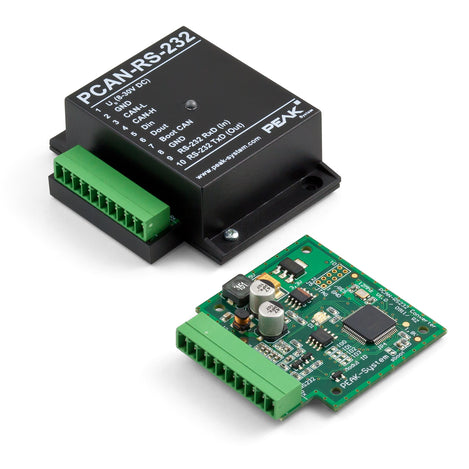

Programmable CAN bus to RS232 Adapter (PCAN-RS232)
Product Images
Programmable CAN bus to RS232 Adapter (PCAN-RS232)
SKU: GC-CAN-RS232-PGM
MPN: IPEH-002100
Manufacturer: Peak System Technik
We Have You Covered


Product Information
Product Description
Convert RS232 serial data to CAN bus seamlessly with the programmable PCAN-RS232 adapter (IPEH-002100). Use the default program supplied with the adapter or program your own software into the adapter to customize it to your protocol.
This CAN to RS232 converter features one CAN channel and one RS232 port for flexible data handling. The data traffic between CAN and RS232 is controlled by a freely programmable microcontroller, making this device an ideal RS232 CAN converter for various applications. With the PCAN-RS232, devices lacking CAN connectivity, such as PLC systems, can connect to a CAN bus via an RS232 protocol.
Use the provided library and Yagarto toolchain to develop custom firmware and transfer it to this 232 CAN adapter seamlessly. Designed with versatility in mind, this CAN bus adapter supports data manipulation, evaluation, and efficient routing for a variety of protocols.
The PCAN-RS232 converter comes preloaded with firmware for routing data from CAN to RS232 and vice versa, ensuring easy integration. The RS232 to CAN adapter allows you to configure both data transfers and hardware with serial control commands. The corresponding source code is included.
NOTE: To configure or transfer firmware via CAN, a Peak CAN interface is required.
Features
- NXP LPC21 microcontroller (16/32-bit ARM CPU)
- 32K bytes EEPROM
- 1x physical CAN channel, baud rates up to 1M
- 1x RS232 serial port, baud rates up to 115.2K
- 1x digital input, 1x digital output
- 2 color LED functions
- 10 position terminal block connectors for RS232, CAN, Power, I/O
Documents and Drivers
Documentation
PCAN-RS232 User Manual
Downloads
PEAK-Flash 2
PEAK-DevPack - Development package for ARM-based products
CAN Download Support
View the available Peak System downloads:
Specifications
Certifications
CE
Connector(s)
10 position terminal block connectors for RS232, CAN, Power, I/O
Dimensions
68 x 57 x21 mm
Enclosure
IP20 Aluminum
Mounting
Din Rail or Wall Mount
MPN
IPEH-002100
Power
8 to 30 Volts DC (70mA @ 12V)
Product Weight
36 grams
Temperature Range
-40ºC to 85ºC (-40ºF to 185ºF)
Warranty
WARRANTY: 1 YEAR COMPREHENSIVE SUPPORT FOR ALL PRODUCTS *SOME EXCEPTIONS APPLY
Have a Special Request?
Please fill out the information below and our sales team will respond within 1 business day.
What you can expect from Grid Connect:
- High quality industrial networking and IoT solutions.
- Hundreds of product options to fit your needs, many available to ship same or next day.
- Unmatched technical support.
- Customization options to fit your needs.
- Price match guarantee on all products.
