


$49.95
Holiday Hours Notice: We will close at noon CT on Friday, May 22, resuming business on Tuesday, May 26. Orders placed after 11 AM CT on May 22 will be processed on May 26.
View full holiday schedule

Grid Connect can customize or produce a product based on our technology that fits your requirements.

Quickly and effectively implement your partial or complete, networking or embedded product.

We specialize in solving challenging IoT problems in demanding environments. No matter your application requirements.


$505.00
SKU: GC-CSS-CANMOD-TMP
MPN: D012
Manufacturer: CSS Electronics ApS
Stock Status: In stock
The CANmod.temp adds 4 channels of thermocouple temperature data to any CAN bus. It runs standalone with no PC required and broadcasts each reading as a configurable CAN frame at 5 Hz. For bench testing and setup checks, you can also stream the data over USB.
Set the thermocouple type separately for each channel: B, E, J, K, N, R, S, or T. A MAX31856 precision converter handles cold-junction compensation, linearization, and 50/60 Hz line-noise filtering, so the module outputs temperature directly in °C. A DBC (CAN database) file is included for decoding in your CAN software.
Send the data to your ECUs (electronic control units), CAN displays, or telematics units. You can also pair the module with a CSS Electronics CANedge data logger to record vehicle data and temperature data in the same time-synced file. For more channels, daisy-chain modules to get 8, 12, 16, or more.
The CANmod.temp ships with the module and a USB dust cover. Order probes separately:
A mini USB cable for configuration, firmware updates, and streaming is also not included.
Important: When measuring conductive surfaces such as metal, you must use isolated thermocouple probes.
Standalone in your CAN network. Power the module at 5-26 V DC and connect it to any high-speed CAN bus (2.0A or 2.0B). It adds temperature frames alongside your existing traffic. You can set the bit rate and CAN IDs to avoid conflicts with other nodes.
Add-on for the CANedge. Turn on the CANedge’s 5 V power output on its second port. The CANmod.temp then runs from that port and logs time-synced temperature data on channel 2, while channel 1 records vehicle or machine data. With a CANedge2 or CANedge3, log files can upload over Wi-Fi or 3G/4G for temperature telematics.
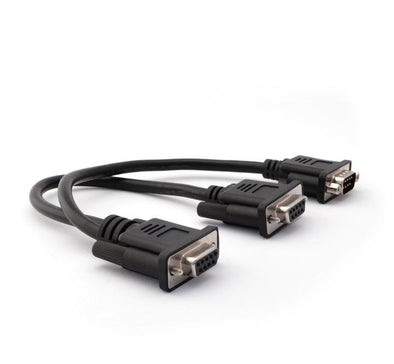
Daisy-chained for more channels. Each module sends all 4 temperatures in a single CAN frame, which keeps chaining simple. Use a DB9 Y-splitter to connect additional modules, and give each one unique CAN IDs.
USB streaming for bench work. Stream readings in real time to SavvyCAN or Python. This lets you validate your setup before deployment.
No. The package includes the CANmod.temp module and a USB dust cover. Probes and the mini USB cable are sold separately. The 4-probe Type K set is ready to use with the module. You can also use any thermocouple with a miniature male connector.
The right type depends on your temperature range and accuracy needs:
You can set each of the 4 channels to a different type.
Resolution is the smallest change the module can report. You can output temperatures at 1 °C resolution in 1 CAN frame, or 0.01 °C resolution in 2 frames. The 0.01 °C setting is useful for tracking small changes over time. Absolute accuracy depends mainly on your probe, plus the module’s cold-junction accuracy of ±0.7 °C maximum (from -20 °C to +85 °C).
No. The CANmod.temp outputs data onto a CAN bus or over USB. It does not store data or push it to a server. To record or upload readings, pair it with a CAN data logger such as the CANedge, or with any CAN interface.
CANmod.temp Documents
In the box
Function
Outputs temperature data from 4 thermocouples via CAN bus and/or USB
Sensor channels
4 thermocouple channels, plus ambient temperature via cold junction
Converter
MAX31856MUD+ precision thermocouple converter
Thermocouple types
B, E, J, K, N, R, S, T (configurable per channel)
Measurement range
-210 °C to +1800 °C (-346 °F to +3272 °F), depending on thermocouple type
Output format
Degrees Celsius via automated linearization
Accuracy
Lab-grade thermocouple voltage measurement with cold-junction compensation
Cold-junction accuracy
±0.7 °C max (-20 °C to +85 °C)
Resolution
1 °C (1 CAN frame) or 0.01 °C (2 CAN frames). The 0.01 °C resolution typically exceeds practical probe accuracy.
Filtering
50 Hz or 60 Hz line-noise rejection, including harmonics (configurable)
Fault detection
Open thermocouple, over-temperature, and under-temperature, reported via CAN
Input protection
Thermocouple inputs protected against overvoltage up to ±45 V
Isolation
Isolated probes required when measuring conductive surfaces
CAN signals
Thermocouple temperatures, ambient temperature, and fault status, each at 5 Hz
CAN channels
1
CAN standard
ISO 11898, 5 kbit/s to 1 Mbit/s
CAN identifiers
CAN 2.0A (11-bit) and 2.0B (29-bit)
Output modes
Broadcast (push) or on-request (poll), configurable per message
Bit rate
Standard rates from 5 kbit/s to 1 Mbit/s, or custom bit timing (default 250 kbit/s)
Message configuration
Enable or disable each message, set each CAN ID, and prescale each message rate
Retransmission
Frames that lose arbitration or are disturbed by errors are retransmitted
Transceiver protection
±25 kV HBM ESD, ±12 kV IEC ESD, ±14 V bus fault, short circuit; ±12 V common-mode input; TXD dominant timeout
Termination
120 Ω, switchable via switch below DB9 connector
Power supply
+5 to +26 V DC via DB9, or USB power for configuration, firmware updates, and streaming (not included)
Power consumption
Less than 1 W
Electrical protection
LEDs
3 (Power, CAN bus, Memory)
Configuration
JSON-schema config files; free open-source editor (online or offline)
Firmware
Free updates via USB
Dimensions
65 x 48 x 24 mm (2.56 x 1.77 x 0.94 inches) (W x L x H, excluding flanges and connectors)
Weight
80 g (0.035 ounces)
Enclosure
Aluminum, IP40
Operating temperature
-25 °C to +70 °C (-13 °F to +158 °F)
Mounting
Velcro strips, zip ties, or mounting kit (not included)
Certifications
CE, FCC, IC, RoHS
Security support
Security updates and vulnerability handling for at least 5 years from purchase (EU CRA)
Warranty
1 year
$49.95

$79.95
Please fill out the information below and our sales team will respond within 1 business day.
What you can expect from Grid Connect:
